How to use Docker in your personal projects?
Docker has become a popular tool for developers looking to ease environment setup, dependency, management and deployment. Docker may simplify your life whether you are developing a full stake project, a data analysis pipeline or a basic web application.
This article will take you step-by-step through the definition of Docker, its benefit and how to incorporate it into your own project.
What is Docker?
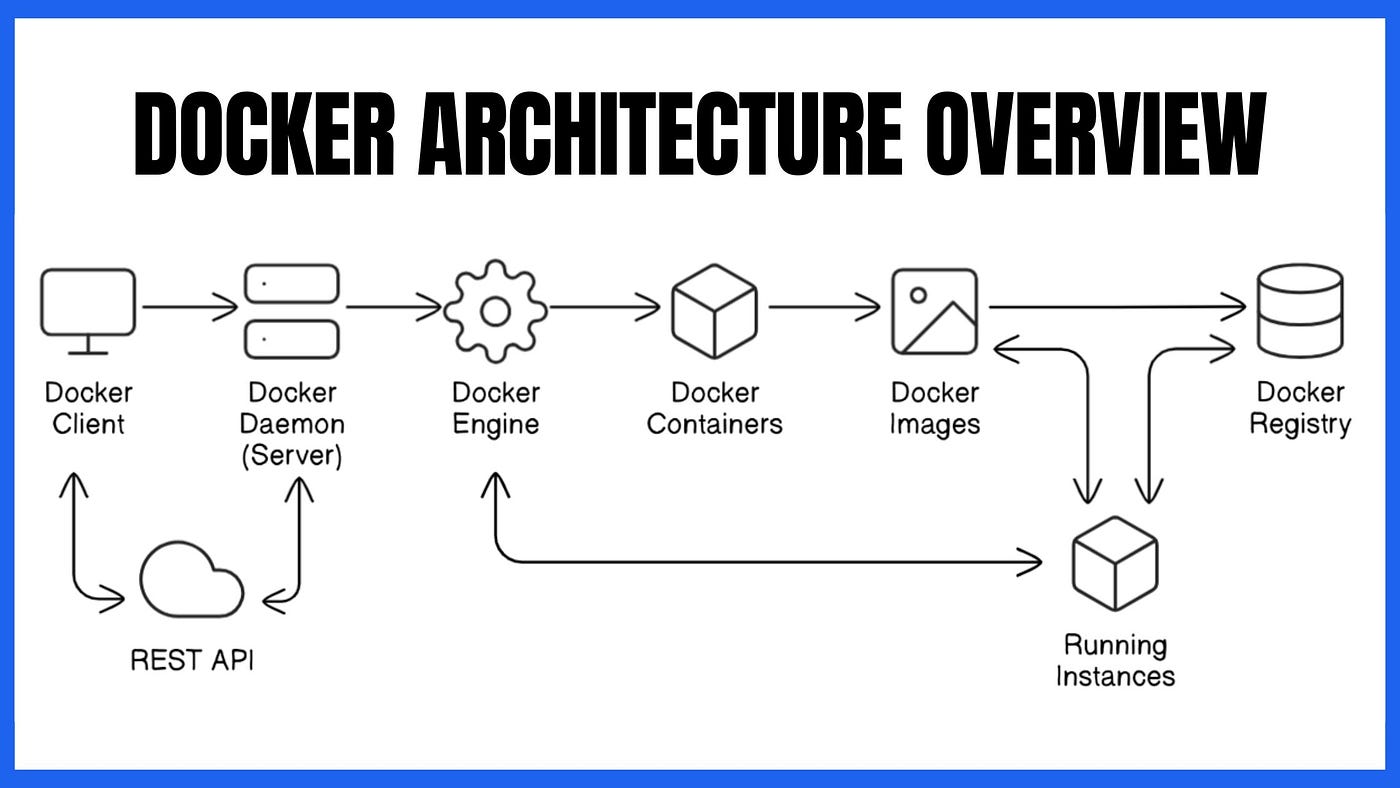
Docker is an open source framework for packaging your program and dependencies into containers. A container is a small, standalone executable that contains everything required to run the application, including code, run time system tools, libraries and settings. containers, unlike virtual machines, are lightweight and leverage shared resources from the host operating system, allowing them to run more quickly and efficiently. Simply, Docker is similar to a box that contains everything your project requires to "bake Properly", the application, the necessary tools and even the setup instructions.
Tis container includes:
Code: Your project's code, like LEGO instructions.
Dependencies: The specific pieces (libraries, frameworks) your project needs.
Environment: The settings and tools required to build and run your project.
Why Using Docker in Personal Project?
Using docker in personal projects can significantly enhance development consistency. Here are few good reasons:
(i): Consistent environment
(ii): Version Control
(iii): Simplified Deployment
(iv): Easy Setup
Here's a step-by-step guidance to get you started:
Setting Up Docker
1- Install Docker: Download and install docker desktop for your operating system (Mac, Window or Linux).
2- Verify Installation: Run "docker--version" In you terminal to confirm successful installation.
How to Use Docker?
1- Create a Docker file: This is like a recipe for your project container. It lists the dependencies and settings.
2- Build the Docker Image: This creates a snapshot of your project's container.
3- Run the Container: This start your project in a container, using the snapshot.
Example: Running a Simple Web Server
Imagine you want to host a simple simple website. You can use docker to create a container with a web server.
1- Specify the web server software (like Nginx) your website files. or you combine the component of your project (software, files and settings) in to a single file.
2- Create a snapshot of your website container.
3- Start the container, run it through docker, like pressing "play" and your website will be live.
4- Nothing else need to installed. docker takes care of everything within the box.
Benefits Of Docker
Consistency: Your project works the same way on different computers.
Efficiency: Because of using docker, you don't need yo install and manage dependencies manually.
Flexibility: Easily switch between projects with different requirements.
Conclusion
Consider docker to your project's travel ready case. It unpacks the same way wherever you go quickly, cleanly and usable. Docker may save your time, frustration and keep your project organized and manageable even if you are not a programmer. And if you like gaining knowledge and being familiar with a-lot more field you can join us at jobchayan.com, your go-to website, where you can find answers of all areas questions. So, Off your waiting mode here, and try exploring jobchayan.com today!